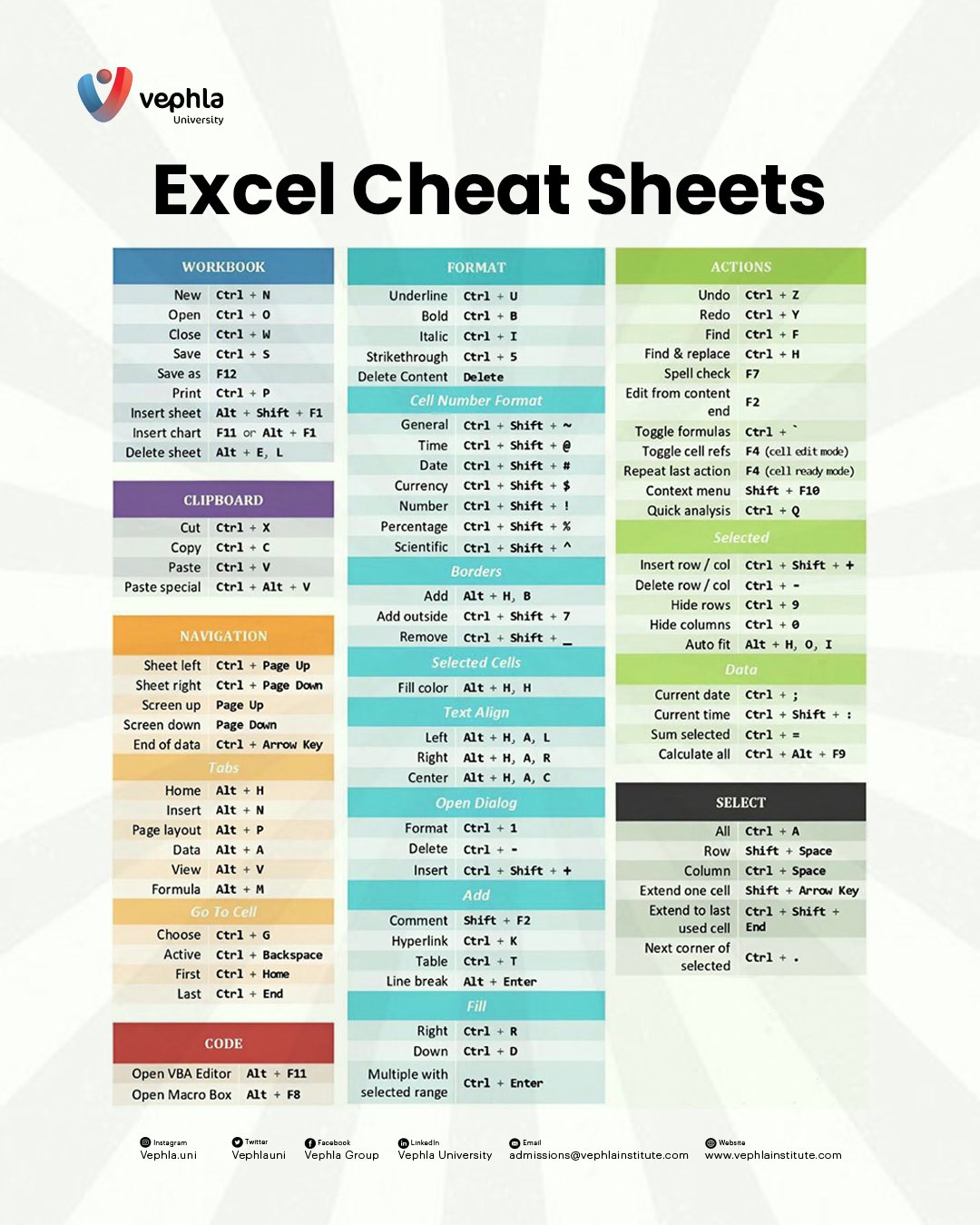
Microsoft Excel remains one of the most powerful and widely used spreadsheet applications in the world. From finance and accounting to marketing, operations, and data analysis, Excel plays a vital role in helping professionals organize information, perform calculations, and make informed decisions. Whether you're just getting started or already have experience using spreadsheets, mastering keyboard shortcuts can significantly improve your speed, efficiency, and overall productivity.
Vephla University has compiled a comprehensive Excel Cheat Sheet that highlights the most useful shortcuts every Excel user should know. This guide explores those shortcuts, covering everything from workbook management and navigation to formatting, advanced functions, and automation.
Efficient workbook management is the foundation of working effectively in Excel. These shortcuts help you quickly create, open, save, print, and organize your spreadsheets without constantly navigating through menus.
Ctrl + N — Create a new
workbook instantly.
Ctrl + O — Open an
existing Excel file.
Ctrl + W — Close the
active workbook.
Ctrl + S — Save your current
work.
F12 — Save a copy using a
different name or format.
Ctrl + P — Open the Print
dialog.
Alt + Shift + F1
Alt + E, LLearning these shortcuts allows you to manage multiple workbooks and worksheets more efficiently while reducing repetitive mouse clicks.
Moving and duplicating data is one of the most common tasks in Excel. Clipboard shortcuts make these actions significantly faster.
Ctrl + XCtrl + CCtrl + VCtrl + Alt + VPaste Special is particularly useful when copying only values, formulas, formatting, or other specific elements from one location to another.
Large spreadsheets often contain thousands of rows and multiple worksheets. These shortcuts make navigation much faster and easier.
Ctrl + Page Up / Ctrl + Page Down
Page Up / Page Down
Ctrl + Arrow Key
Alt + HAlt + NAlt + AThese shortcuts eliminate unnecessary scrolling and help you move through complex workbooks with confidence.
Proper formatting improves readability and helps emphasize important information within your worksheets.
Ctrl + BCtrl + ICtrl + UCtrl + 5DeleteThese simple commands allow you to format spreadsheets more efficiently while maintaining a professional appearance.
Applying consistent number formats improves data presentation and makes reports easier to interpret.
Ctrl + Shift + ~
Ctrl + Shift + $Ctrl + Shift + %Using standardized formatting helps create cleaner spreadsheets that are easier to read and analyze.
Our Data Analytics Nano-Degree covers Excel, Power BI, Tableau, SQL & Python — live, mentor-led, 12 months.
Explore All CoursesEditing, reviewing, and troubleshooting worksheets becomes much faster with these commonly used shortcuts.
Ctrl + ZCtrl + YCtrl + FCtrl + HF7Ctrl + `These commands simplify editing tasks and improve the accuracy of your spreadsheets.
Selecting cells efficiently is essential when working with large datasets. These shortcuts reduce manual effort and improve workflow.
Ctrl + AShift + Space
Ctrl + Space
Shift + Arrow Key
Mastering these shortcuts makes organizing and manipulating data much more efficient.
Visual formatting improves readability and helps present information in a more organized manner.
Alt + H, BAlt + H, HAlt + H, A + L / R / C
These formatting shortcuts help create professional-looking reports with minimal effort.
Excel's dialog boxes provide access to advanced formatting and customization features that extend beyond the ribbon.
Ctrl + 1Shift + F2Ctrl + KThese shortcuts save valuable time while giving you quick access to advanced worksheet customization.
For advanced Excel users, automation through Visual Basic for Applications (VBA) and macros can dramatically improve productivity by reducing repetitive work.
Alt + F11Alt + F8Learning these advanced features allows you to automate repetitive tasks, build custom workflows, and maximize efficiency in Excel.
The Excel Cheat Sheet from Vephla University is an excellent resource for anyone looking to improve their spreadsheet skills. By incorporating these keyboard shortcuts into your daily workflow, you'll work faster, reduce repetitive actions, and become more confident using one of the world's most essential business tools.
Consider printing the cheat sheet or keeping it nearby while you work. With consistent practice, these shortcuts will become second nature, allowing you to navigate, analyze, format, and automate your spreadsheets like a true Excel professional.

The world is becoming increasingly data-driven. From tracking health trends to optimizing business strategies, data analysis i...

I'm a student in Vephla University's Design School, cohort 9B, and I just want to say how grateful I am to the entire team for their amazing teaching and the steady flow of assignments we get after each class.

In the fast-paced world of data analytics, where numbers meet intuition and insights drive innovation, a young star is rising with a b...